E-invoices to municipalities and government institutions with one click from the invoice
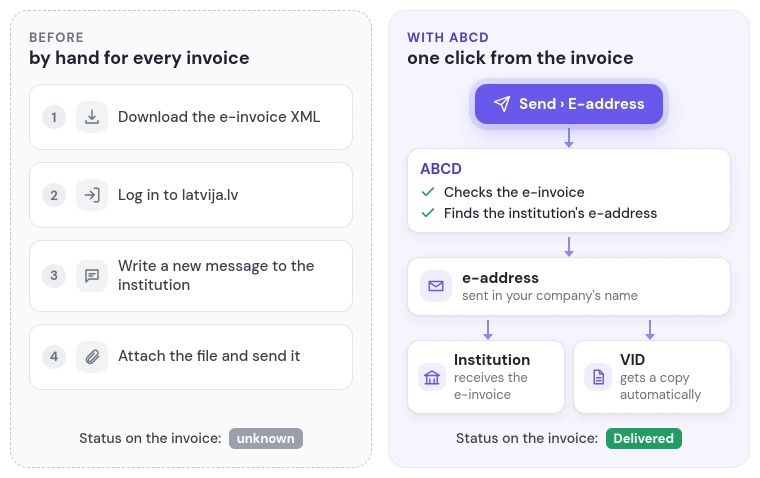
In ABCD, you send an e-invoice to the buyer's e-address (e-adrese) straight from the invoice. Until now, for every invoice issued to a municipality, you had to download the XML, then log in to latvija.lv, write a new message and attach the file. Currently, ABCD sends e-invoices through the e-address system to government and municipal institutions, for which they have been mandatory since 1 January 2025, and it is already prepared for 1 January 2028, when e-invoices will also become mandatory between companies.
A PDF invoice sent by email is not an e-invoice, because the institution needs structured XML, and the Invoicing module already creates it in PEPPOL BIS Billing 3.0 format. You send credit notes to an e-address the same way as invoices, and the "Documents sent to e-adrese" list shows all the invoices and credit notes you have sent with their statuses, so you can also check later what went to which institution.
ABCD finds the institution's e-address and checks the e-invoice on its own
ABCD checks the e-address directory to find out which address the invoice should go to, and if the institution has a separate sub-address for e-invoices, such as E-REKINI@, the invoice goes there. The State Digital Development Agency (VDAA) names a wrong recipient or sub-address as one of the most common mistakes. The customer's "E-adrese" card shows which e-address their e-invoices go to and why it was chosen, and if needed, you can set another of the buyer's addresses.
Before sending, ABCD checks every e-invoice against PEPPOL and latvija.lv rules, and as long as it contains errors, the "Send" button stays disabled and the sending panel shows what needs to be fixed. The e-invoice that goes to the institution is exactly the one ABCD checked.
A status for every e-invoice: see whether the institution received it
After sending, ABCD shows the status of each submission on the invoice, so you can see whether the e-address system accepted the invoice and whether the buyer received it. If the invoice was rejected or sending failed, the status also shows the reason, and the user who sent the invoice gets a notification. You no longer have to call the institution about an unpaid invoice just to find out whether it got there at all.
If you reopen an invoice for editing after it has been sent, ABCD warns you that the buyer and the State Revenue Service (VID) keep the version that was sent, so the proper correction is a credit note and a new invoice. You can see in the Invoicing module whether a delivered invoice has been paid once a bank statement has been imported, but with the Swedbank Gateway module, statements from Swedbank arrive on their own.
E-invoice copies for VID and e-invoices between companies from 2028
The e-address system itself passes VID a copy of the e-invoices sent through it, so you don't have to upload them to the VID Electronic Declaration System (EDS) by hand. From 1 January 2028, e-invoices will also be mandatory between companies: the Latvian parliament (Saeima) postponed this deadline from 2026. ABCD is already prepared for e-invoices between companies and will switch on sending to companies through the e-address system as soon as the law allows it.
The e-address connection and the price
ABCD sends e-invoices in your company's name through its own e-address connection, already approved by VDAA, and your company only has to be connected once: ABCD prepares the application to VDAA and signs it first, and then your company signs it and sends it from its own e-address. Sending to e-addresses is included in the Invoicing module at no extra charge, and you don't pay for each e-invoice you send. By contrast, many other e-invoicing services charge for each document.