
Features

CRM system: leads, deals and customer history in one place

A CRM system keeps a company's leads, deals and all correspondence with customers in one place. In ABCD, the CRM module works together with invoicing and the customer database: website leads arrive in the Lead Inbox, deals move through the stages you define, and each customer's history is kept on a single card.

A CRM that works together with your invoices and customer database

In ABCD's CRM module, you keep all your leads, deals and communication with customers, and your colleagues can see what has been discussed with a customer and what needs to happen next. The module runs in the same system as your invoices and customer database, so you don't have to enter a customer twice.

Our guide What is a CRM system explains in more detail what a CRM system does and how to choose one.

As long as your deals are in an Excel spreadsheet, only the person who last updated it sees the full picture. In ABCD, every customer has a "History" tab that shows changes, comments, emails, SMS and Telegram messages in chronological order. The History tab is part of the ABCD core, and in the CRM module every deal has one just like it.

Website leads arrive in the Lead Inbox

If you connect your website form to the ABCD API, leads from it go automatically to the Lead Inbox in the CRM module. Each lead has a timer that shows how long it has been waiting for someone to pick it up and how long someone has already been working on it.

When a new lead comes in, or a colleague picks up or closes a lead, the list updates for everyone at once, and the "Unassigned" tile shows how many leads are still waiting. A salesperson clicks "Assign to me", and everyone can see who is handling the lead, while the leads nobody has picked up yet stay visible to everyone, along with their waiting time.

A lead whose email or phone number is already in the customer database is linked to the existing customer, so no duplicate is created. If earlier leads with the same email or phone number were converted into deals or rejected, a badge appears on the new lead, and you can open those earlier leads.

Sales pipeline: deals in the stages you define

You convert a lead from the Lead Inbox into a deal by choosing a board and a status, and the system finds the customer in the customer database or creates a new one. Deals are laid out on boards whose stages and colors you define yourself, and you can view them either as a kanban board, where you drag a card to another stage, or as a table.
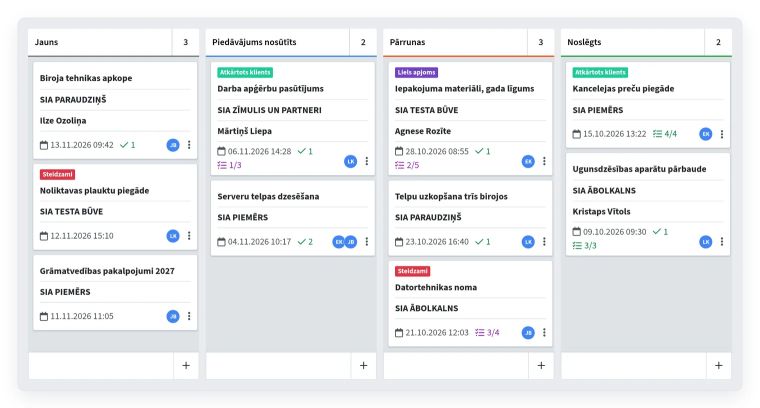
Deal board in the CRM module with the stages New, Offer sent, Negotiation and Closed, and deal cards showing the customer, the person responsible, labels and reminders

You can add a reminder to each deal with the date and time when you need to call or write to the customer, and once a deal is won, the system can create the next reminders automatically. If a deal has a label with a checklist, the deal can only be closed once every item on the list is done, and each item shows who completed it and when. When two salespeople work with the same customer, the deal shows who is responsible for that customer, and that person gets a notification.

Email, SMS and Telegram from the customer card

You can write an email, SMS or Telegram message from a customer or deal card. The customer's reply to an email goes into the history of the same record, and the employee who sent the email receives it as well.

Marketing emails and SMS usually require the customer's consent, and the company must be able to prove it was given. On the consent form, the customer selects the channels through which they may be contacted, and the system saves the time, IP address, email address and browser. This helps you prove later that the customer agreed.

CRM for car and motorcycle dealers

For car and motorcycle dealers, the CRM module has a vehicle configurator: in 11 steps you choose the brand, model, engine and equipment from your own catalog, and the offer for the customer is ready as a PDF instead of being put together by hand in Word. You can also prepare an offer from a car in stock, and the offer then takes on that car's configuration. If you also have the Car sales module, then when you close a vehicle sales contract, you can close the deal linked to it right away.

Sound familiar?

Website leads come in by email, and nobody knows who will reply

Solution

Your website sends leads through the API straight to the Lead Inbox in the CRM module. A salesperson clicks "Assign to me", and everyone immediately sees who is handling the lead.

We don't know where our customers come from

Solution

The CRM module stores the source and UTM tags your website sends with each lead, and the "Leads by source" widget shows which channel your leads come from.

Our deals are in an Excel spreadsheet, and we can't see which stage each one is in

Solution

In the CRM module, you organize deals on boards with your own stages and colors: you can drag a card to the next stage as you would on a kanban board or, if that's easier, view all deals in a table.

We forget to call customers back after sending an offer

Solution

In the CRM module, you can add a reminder with a specific date and time to a deal so you don't forget to call or write to the customer. Once a deal is won, the system can create the next reminders automatically.

Who it's for

Companies that get leads from their website

Leads arrive in the Lead Inbox through the API, a salesperson picks them up with the "Assign to me" button, and a timer shows how long each lead has been waiting.

Small and medium-sized businesses that keep their deals in an Excel spreadsheet

Deals, reminders, invoices and the customer database are in one system, and the board shows which stage each deal is in.

Car and motorcycle dealers

You prepare an offer in the vehicle configurator or from a car in stock and send it to the customer as a PDF. With the Car sales module, the Deal Flow report also shows test drives, contracts and deliveries.

What customers say

A flawless solution for resource planning.

The resource planner and the task module are an ideal help for organising our daily work, letting us manage team tasks more efficiently and plan work schedules. The CRM module lets us keep track of all communication with customers, put together custom car offers, tasks and more. All the information is easy to see and kept in one place, which we are very happy with.

Frequently asked questions

What is a CRM system?

A CRM system is software that keeps leads, deals and all communication with customers in one place, so colleagues can see what has been discussed with a customer and what needs to happen next. ABCD's CRM module works together with your invoices and customer database.

How much does a CRM system cost per month, and do you pay for each user?

The price of the CRM module is made up of a monthly fee for the module itself and a small fee for each user who works in it that month, but you don't pay for users who only view data. To find out the price for your company, contact us or request a trial on our website: you can try the module free for one month.

Can I connect the CRM to my website form?

Yes. Once your website form is connected to the ABCD API, leads from it go straight to the Lead Inbox in the CRM module. The form can send the source and UTM tags along with each lead, and the "Leads by source" widget then shows which channel your leads come from.

How is CRM different from ERP, and do I need both?

A CRM system helps you sell: it holds leads, deals and communication with customers, while an ERP system handles the rest of the company's work, such as invoicing and the warehouse. In ABCD ERP, invoicing, the warehouse and CRM share one customer database, and you turn on the CRM module when you need it.

Can I send marketing emails and SMS to customers, and how do I prove consent?

Usually only with the customer's consent, and the company must be able to prove it. Existing customers may also be sent emails about similar products or services without consent, as long as they have not objected and every email lets them opt out easily and free of charge. The ABCD consent form saves the channels the customer chose, the time and the IP address.


Would this module be useful for your company?

You can try each paid module free for one month.

Other features

Invoicing

Invoices, e-invoices and payment tracking

Warehouse management

Stock levels, cost prices and picking

Swedbank Gateway

Bank statements and payments from Swedbank

Tildes Jumis integration

Invoices and payments arrive in Tildes Jumis

Payment links

Online invoice payment via link and QR code

Customer and product database

Customers, suppliers, products and price lists

API integration

Connecting your online store, website and other systems

B2B orders

Personal online store for business customers

Email campaigns

Newsletters and email marketing

Resource planner

Bookings by the hour for each resource

Task manager

Tasks, deadlines and a kanban board for your team

Document generator

Contracts and handover forms from your Word templates

Complaint register

Complaints, claims and response deadlines

Coupons and surveys

Gift cards, coupons and customer surveys

Call log

Callback list and notifications

News

Internal announcements and news for employees

CMR consignment notes

Filling out and printing CMRs from your template

Special tools

Who has each tool and when it's due back

Car sales

Sales contracts, prepayment and final invoices

Key management

Where each car's key is

Tire hotel

Customer tire storage and storage receipts