
Features

Tire hotel: tire storage software with storage receipts and photos

The ABCD ERP Tire hotel module tracks tire storage for tire shops and car service centers: you can see where each customer's tires are stored, record the tread depth and print a storage receipt with photos. Before the season, you can use the Email campaigns module to write to the customers whose tires you're storing.

Tire storage tracking instead of a logbook or Excel

The ABCD ERP Tire hotel module is tire storage software you can use instead of a logbook or an Excel spreadsheet, and it keeps all the tires your customers have left in storage in one place. Each set of tires is linked to a customer, a contact person and a car, so when a customer comes to pick up their tires in the fall or spring, you look up the set by their name or car and mark the tires as returned right there. You also record the storage location for each set, so you know right away where the tires are.

The module takes customers and cars from the ABCD customer database and vehicle register, so you don't need any other paid module for the tire hotel.

What you record when taking tires into storage

When you take tires in, you record in the Tire hotel module the brand and model, size and index, season, number of tires and whether they're stored with or without rims. You note the tread depth of each tire and attach photos to the record, so even six months later you can show what condition the tires were in when you received them.

This matters because when storage is paid for, the shop bears responsibility for the tires: under Section 1972 of the Civil Law (Civillikums), a custodian is liable for any negligence, and liability is limited to malicious intent and gross negligence only when goods are stored free of charge.

Tire storage receipt signed by both parties

From the tire hotel record, you print a tire storage receipt that lists the customer, the car with its registration number and VIN, the mileage, the tire details and tread depth, and also includes photos and your storage terms. The receipt has signature fields for "Tires handed over" and "Tires accepted", so if a dispute about the condition of the tires comes up later, you have a document signed by both parties.

For a foreign customer, you can print the receipt in any of your company's languages, such as English or Estonian, and they sign the document in a language they understand.
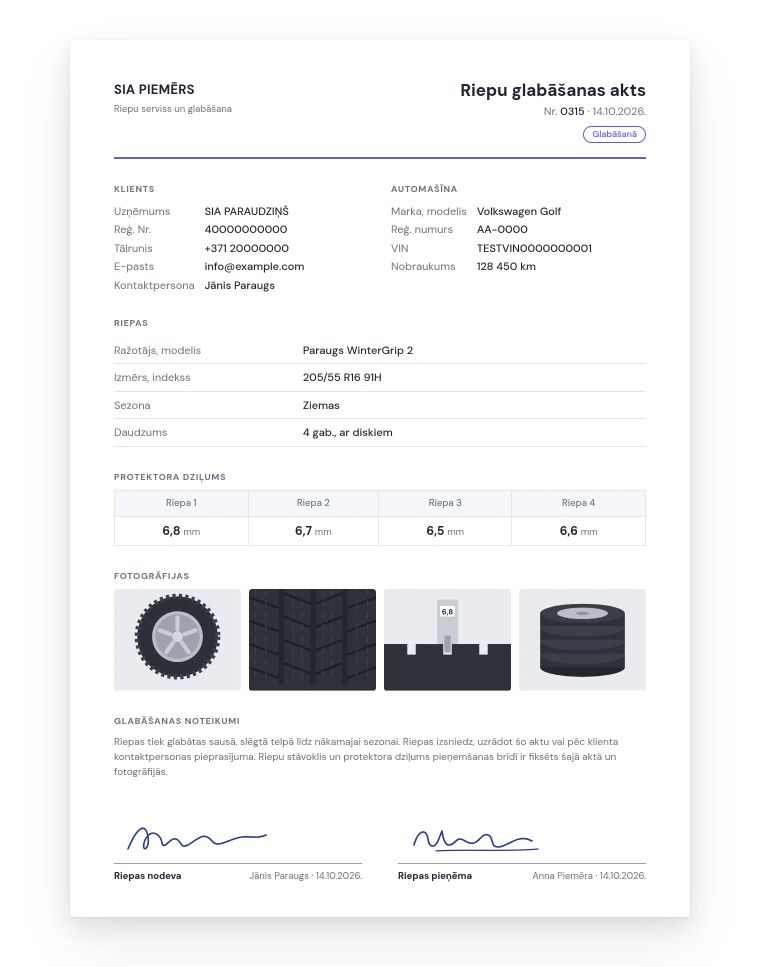
Tire storage receipt with customer, car and tire details, tread depth for each tire, photos and signatures of both parties

Returning tires to customers and the storage list

When the customer collects their tires, you choose the "Return tires to customer" action, and the set gets the status "Returned" with the return date and time. In the tire hotel list, each set has the status "In storage" or "Returned", and at any time you can see what's still in storage. Both returning tires and undoing a return are logged in the history, which shows which employee returned the tires and when.

An email before tire change season

If you also have the Email campaigns module, you can send a pre-season email to just the customers whose tires are currently stored in your tire hotel, or to everyone who has ever stored tires with you.

Section 9 of the Law on Information Society Services (Informācijas sabiedrības pakalpojumu likums) sets out when and under what conditions you may send such emails without the customer's separate consent, so it's worth reading before your first campaign.

Sound familiar?

In spring, we can't find where a customer's tires are stored

Solution

In the Tire hotel module, every set of tires has its storage location on record, and you look up a set by the customer's name or car, so the customer at the counter doesn't have to wait long.

A customer says we returned their tires in worse condition

Solution

When you take tires into storage, you record the tread depth of each tire in the Tire hotel module and attach photos. All of this goes on the storage receipt, which both your employee and the customer sign, so if a dispute comes up, you can show a signed document.

Before the season, we want to write to the customers whose tires we're storing

Solution

With the Email campaigns module, you can send an email to just the customers whose tires are currently stored in your tire hotel, or to everyone who has ever stored tires with you.

We don't know which tires are still in storage and who handed the rest back

Solution

In the Tire hotel module, each set has the status "In storage" or "Returned" with the return date and time, and the history shows which employee handed the tires back and when.

Who it's for

Tire stores and tire installation shops

During the season, when there's a line at the counter, you find a customer's tires by name or car and mark them as returned right there, and before the season you can use the Email campaigns module to write to the customers whose tires you're storing.

Car service centers that store customers' seasonal tires

You record each set of tires under the customer and their car, and the tread depth, photos and signed receipt show what condition the tires were in when you took them in.

Car dealers that store customers' tires between seasons

A customer's summer or winter tires are recorded under their car along with the storage location, so when the customer arrives, you see right away where the tires are. You can print the storage receipt in any of your company's languages, for example English.

Frequently asked questions

How much does the tire storage software cost, and can I try it?

The price depends on the modules you choose and the number of users, and viewing alone is free. You can try the Tire hotel module free for one month: request a trial, and ABCD will set up an account for your company.

What should a tire storage receipt include, and is there a ready-made template?

With the Tire hotel module, you don't need a template, because you print the finished receipt from the record. The receipt lists the customer, the car with its registration number and VIN, the mileage, the tire details and tread depth, includes photos and your storage terms, and has signature fields for "Tires handed over" and "Tires accepted".

Can I print a customer's tire storage receipt in another language, such as English?

Yes, in the Tire hotel module you can print the storage receipt in any of your company's languages, such as Latvian, Estonian or English. That way a foreign customer signs the receipt in a language they understand, while the tire details, tread depth and photos on it stay the same.

Is the tire hotel linked to the customer database?

Yes, the Tire hotel module uses the ABCD customer database and vehicle register, so each set of tires is linked to a customer, a contact person and a car, and you can look up a set by customer or car. You don't need any other paid module for tire storage.

Can I restrict which employees can edit or delete tire storage records?

Yes, permissions in the Tire hotel module are set per role: for each role, you decide whether its users can view, add, edit or delete records. Both returning tires and undoing a return are logged in the history, which also shows who returned the tires to the customer and when.


Would this module be useful for your company?

You can try each paid module free for one month.

Other features

Invoicing

Invoices, e-invoices and payment tracking

Warehouse management

Stock levels, cost prices and picking

Swedbank Gateway

Bank statements and payments from Swedbank

Tildes Jumis integration

Invoices and payments arrive in Tildes Jumis

Payment links

Online invoice payment via link and QR code

Customer and product database

Customers, suppliers, products and price lists

API integration

Connecting your online store, website and other systems

B2B orders

Personal online store for business customers

Email campaigns

Newsletters and email marketing

CRM

Leads, deals and customer communication

Resource planner

Bookings by the hour for each resource

Task manager

Tasks, deadlines and a kanban board for your team

Document generator

Contracts and handover forms from your Word templates

Complaint register

Complaints, claims and response deadlines

Coupons and surveys

Gift cards, coupons and customer surveys

Call log

Callback list and notifications

News

Internal announcements and news for employees

CMR consignment notes

Filling out and printing CMRs from your template

Special tools

Who has each tool and when it's due back

Car sales

Sales contracts, prepayment and final invoices

Key management

Where each car's key is