
Features

A B2B online store where each customer sees their own prices and places orders themselves

A personal online store for each of your business customers: the customer opens their own link, sees their own prices and your stock levels, and places orders themselves. Each order arrives in ABCD as a sales order, and your employees are notified. The store has its own name, logo, color and languages. Requires the Warehouse management module.

Customers place their own orders, and nobody has to retype them

With the B2B orders module in ABCD ERP, each of your business customers gets a personal B2B store: they open their own link, see their products and prices, and order whenever it suits them. The order arrives in ABCD as a complete sales order with its order lines, prices, delivery address, comment and the customer's order number, so there is nothing to retype.

Anyone who has retyped orders from phone calls, emails and WhatsApp messages knows how easily a line goes missing or a quantity gets mixed up. The staff members you have chosen are notified of every new store order, and if you want, the customer receives a confirmation email with the order lines and total. Until you accept the order, the customer can edit or cancel it themselves.
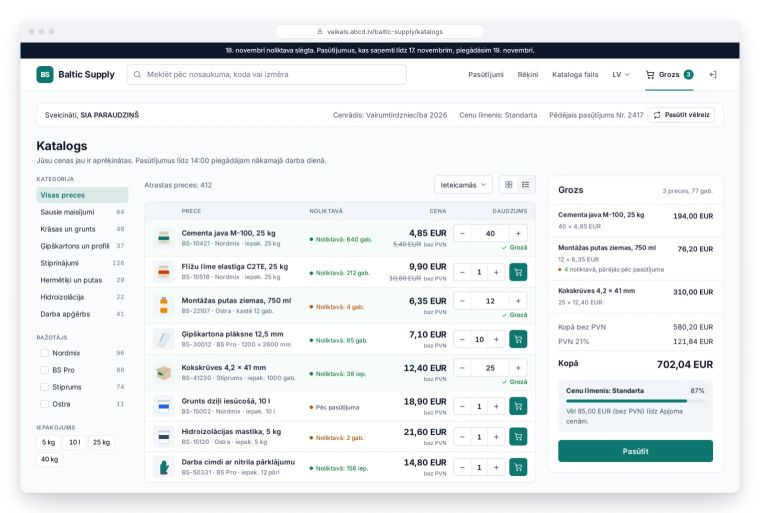
B2B online store catalog: customer prices, product stock levels and a cart showing the price level

Individual prices for each customer and stock levels on every product

In the B2B online store, each customer sees only the products and prices from their own price list, in their own currency, so other customers' prices are not visible to them. If you give large customers volume discounts, the cart automatically picks the price level based on amount or quantity and shows how much more is needed to reach the next level.

Customers see the available stock on every product, so they no longer have to call and ask whether an item is in stock. They can also search for products by code or barcode. The cart automatically respects pack sizes and minimum quantities, and if you have set a minimum order amount, the store does not accept smaller orders.

Order tracking and invoices in the customer's account

In their B2B online store account, customers see the status of every order: received, confirmed, invoiced, shipped (with a tracking number) or paid. Their invoices are there too, with payment status, and each one can be downloaded as a PDF, so customers find invoice copies themselves instead of asking your staff.

You issue invoices from orders in the Invoicing module and can also send them as PEPPOL e-invoices. Structured e-invoices between Latvian companies will be mandatory from 1 January 2028. If a customer orders the same items every time, they click "Order again" and the lines from their previous order are back in the cart at today's prices.

No development project and no price syncing

Products and price lists, as well as stock levels from the Warehouse management module, come into the B2B online store straight from ABCD, so there is no separate system to sync prices with, and you do not need to commission an integration with warehouse or accounting software. Agencies typically take 6-12 weeks to build a store like this. With the B2B orders module, by contrast, you pay only a monthly fee, and the store works with the data you already have in ABCD.

The store has its own name, logo, color and welcome text, as well as delivery and payment information. If you have enabled several languages for the store, such as Latvian and English, it opens for each customer in whichever of them is set on their customer card. There are no passwords to remember: customers sign in with their personal link and, if you want, a one-time code they receive by email. If you stop working with a customer, you delete their link and they immediately lose access to the store.

Sound familiar?

Customers order by phone, email and WhatsApp, and we retype the orders

Solution

Customers place orders themselves in their own B2B online store (the B2B orders module), and each order arrives in ABCD as a sales order with its lines, prices, delivery address, comment and the customer's order number.

Every customer has their own price, so a regular online store won't work

Solution

In the ABCD B2B online store, each customer sees only the products and prices from their own price list and price level, in their own currency. No one else can see your prices, because the store only opens through the customer's personal link.

Customers call to ask whether an item is in stock

Solution

In the ABCD B2B online store, customers see the available stock on every product: low stock is highlighted, and products that are out of stock are marked as available to order.

We want an online store, but not another system to sync prices with

Solution

Products, price lists and stock levels in the B2B online store come straight from ABCD, so there is no separate system to sync prices with, and no integration project either.

Who it's for

Wholesalers and distributors

If your customers order regularly and each has their own price list, they place orders themselves in the B2B online store and you receive a complete sales order.

Manufacturers that sell to resellers and stores

Resellers see their own prices and available stock in the B2B online store, the cart shows how much more they need to reach the next price level, and a minimum order amount filters out small orders.

Suppliers to restaurants, cafes and offices

A customer who orders the same products and ingredients every week uses the "Order again" button to put the lines from the previous order into the cart at today's prices.

What customers say

Using the ABCD system has made our daily work easier and clearer. Especially useful for us is the module that lets us create a personalised product list for customers. Customers can pick the products they need and place an order, and the invoice is prepared automatically.

Frequently asked questions

How much does the B2B store in ABCD cost?

The price depends on the modules you choose and the number of users. For the B2B online store, the B2B orders module also needs the Warehouse management and Invoicing modules. There is no development fee, and viewing is free. Each paid module can be tried free for one month: request a free trial and we will set up an account for your company.

Can I try the B2B online store for free?

Yes, the B2B orders module, like every paid module, can be tried free for one month. ABCD staff set up your company in the system, so you request a trial on the "Request a free trial" page at abcd.lv, and we will contact you.

Does the B2B online store need to be integrated with warehouse or accounting software?

No, the B2B orders module takes products, price lists and stock levels straight from ABCD, and orders arrive in the same system as sales orders. That means there is no integration project and no price syncing, and the store does not need separate maintenance.

Do customers need a password for the B2B online store?

No, there are no passwords in the B2B orders module. Customers open the store with their personal link and, if you want, also enter a one-time code they receive by email when signing in. If you stop working with a customer, you regenerate or delete the link, and the old link stops working immediately.

Can the B2B online store also be in English?

Yes, in the B2B orders module you choose a default language and additional languages for the store, such as Latvian and English. Customers can then change the language themselves using the language switcher, and the store opens in the language set on their customer card in ABCD, if it is one of the languages you chose.


Would this module be useful for your company?

You can try each paid module free for one month.

Other features

Invoicing

Invoices, e-invoices and payment tracking

Warehouse management

Stock levels, cost prices and picking

Swedbank Gateway

Bank statements and payments from Swedbank

Tildes Jumis integration

Invoices and payments arrive in Tildes Jumis

Payment links

Online invoice payment via link and QR code

Customer and product database

Customers, suppliers, products and price lists

API integration

Connecting your online store, website and other systems

Email campaigns

Newsletters and email marketing

CRM

Leads, deals and customer communication

Resource planner

Bookings by the hour for each resource

Task manager

Tasks, deadlines and a kanban board for your team

Document generator

Contracts and handover forms from your Word templates

Complaint register

Complaints, claims and response deadlines

Coupons and surveys

Gift cards, coupons and customer surveys

Call log

Callback list and notifications

News

Internal announcements and news for employees

CMR consignment notes

Filling out and printing CMRs from your template

Special tools

Who has each tool and when it's due back

Car sales

Sales contracts, prepayment and final invoices

Key management

Where each car's key is

Tire hotel

Customer tire storage and storage receipts