Subscribers: file import, API, website signup form and QR code
"Email campaigns" is the email marketing module of ABCD ERP, and you can use it instead of MailerLite or Mailchimp. You import subscribers from a CSV or Excel file or add them through the API. New subscribers sign up on their own with a form on your website or a QR code in your store or at a trade show, and each of them confirms the signup by email.
Unlike MailerLite and Mailchimp, ABCD already holds your customers, products and invoices, so you don't need to export your customer list anywhere. By default, campaigns go only to customers whose consent has been recorded.
Who to send to: segments by purchases and customer data
In the Email campaigns module, you select recipients with segments, and a segment can be based on purchases: the product bought, its brand or attribute, the amount invoiced or the date of the last invoice. Purchase data comes from the Invoicing module.
You can also select customers by city, country, language, responsible employee, your own custom customer fields and data from other ABCD modules, and by whether they opened previous emails and clicked links in them.
Newsletters in several languages, without a designer
A single ABCD email campaign can have several language versions, for example Latvian, Estonian and English, so you don't have to create a separate campaign for each language. Each recipient gets the email in their own language if the campaign has a version in that language, and in the main language if it doesn't. If you add your own OpenAI API key, a language version can be translated automatically.
You can build the email from blocks in the editor or start from a ready-made template with your logo and brand color, and you can also paste in your own HTML. In the editor, even someone with no technical skills can put together a complex email with multiple columns, images and buttons, and the finished email adapts to phone screens on its own. With the "Product from warehouse" block, you can add a product with its image and price to the email if you also have the Invoicing module. Before sending, the system checks the email against a checklist, and you can both preview how it will look on a phone and send yourself a test email.
Sending from your own domain
The Email campaigns module sends emails from your company's domain, checks its SPF and DKIM records and warns you if a DMARC record is missing. If there are too many spam complaints or undelivered emails, sending stops automatically.
Statistics: opens, clicks and purchases
For each campaign, you can see how many emails were delivered and opened, how many recipients clicked links and how many times each link was clicked, as well as how many people unsubscribed, how many marked the email as spam and how many addresses are undeliverable. You can also view the statistics for each language version separately and export every recipient's status to Excel.
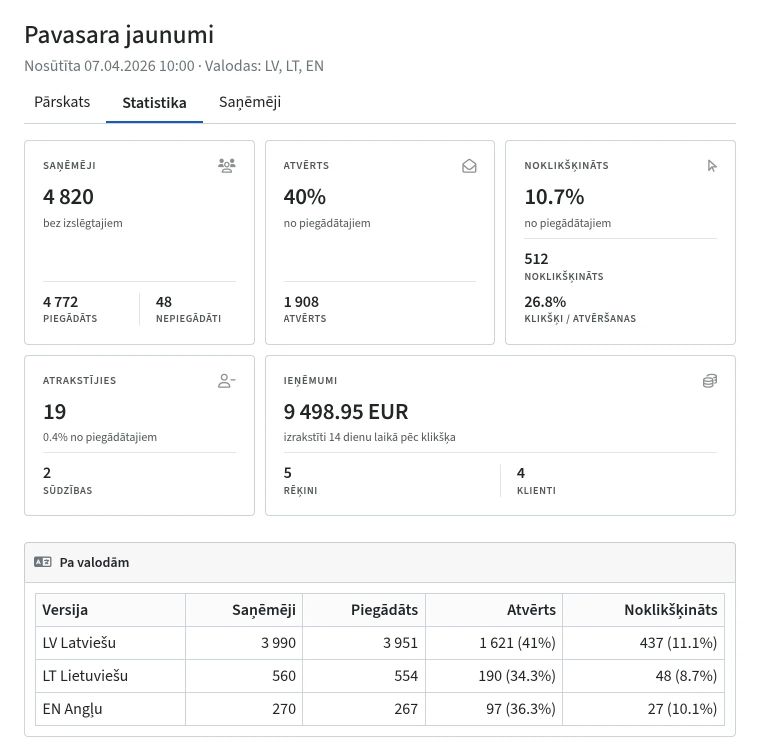
The "Invoices after a click" section shows the invoices issued to customers after they clicked a link in the email, along with the total of those invoices, so you can see what customers bought after the email. You can resend the email to those who did not open it, manually or automatically, optionally with a new subject line.
Email campaign API and emails from any tool
Through the ABCD API, you can manage a campaign entirely from your own system: create it with your own HTML, upload images, send a test, schedule sending and retrieve the statistics. You can also add and unsubscribe subscribers and manage groups through the API.
You can prepare the email in any tool, including AI tools, and upload it in full through the API, the HTML together with its images, just as you upload a .zip archive in the app.