Stock levels in every warehouse, store and delivery van
The Warehouse management module in ABCD ERP is inventory management software that works together with the Invoicing module, and only invoices and other warehouse documents change the stock levels in it. This means stock always matches the invoices you have issued and received, and nothing has to be entered twice.
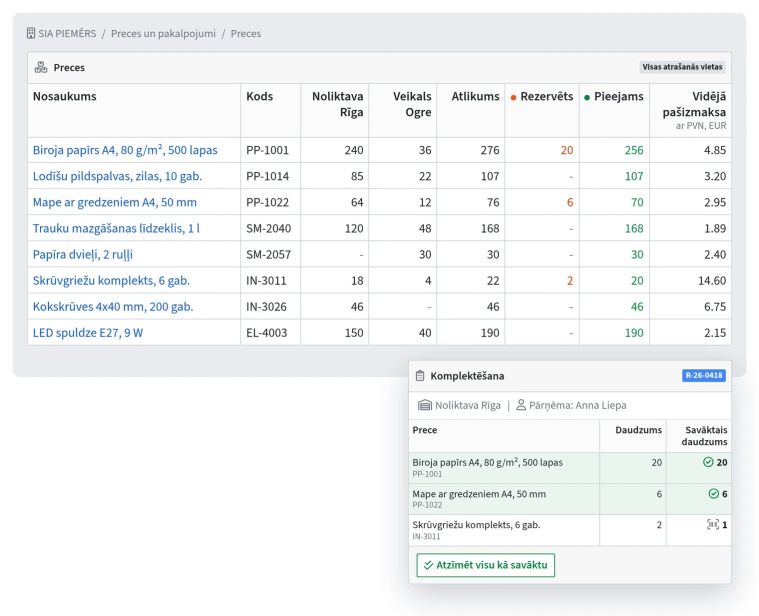
The system shows stock levels separately for each location (a warehouse, store or delivery van), and for each employee you choose which locations they can see and use. You move goods from one location to another with a document that also holds the delivery details. If a location doesn't have the goods you need, the system won't let you move or sell them from there.
Supplier invoices from a PDF or photo, and purchase planning
In the Warehouse management module you don't have to retype supplier invoices by hand, because AI reads them from a PDF or photo: it finds the supplier, matches the rows to your products, checks the amounts and warns you if the invoice has already been entered. Before you save, a preview shows each row with the product found for it. To read invoices this way, you need to add your company's OpenAI API key.
In the purchase planning report, the system uses your sales history to suggest what to order and how much, and prepares a draft purchase invoice for each supplier.
Cost price and profit by product
The module tracks cost price by purchase batch, so every stock movement has its own cost price, and you can see the average cost price as well. You add delivery and customs costs to the purchase invoice as a service row, and the system allocates them across the products. If these costs are left out of the cost price, the profit on a product looks higher than it really is. The sales report shows profit by product, brand, customer and price list, and the profit and loss report shows it by month.
Orders, reservations and picking
If you turn on automatic reservation, the system reserves free stock for open sales invoices. When new stock arrives, it is reserved first for the oldest invoices that are still short of it. If an order can't be delivered in full right away, you send the customer what you have, and the rest stays in an open order. A sales order can be linked to a CRM deal, and the invoice you create from the order shows up under the same deal.
If you issue invoices in the office but goods are picked elsewhere, the Warehouse management module lets you turn on picking, which is already included in the price. A closed invoice then goes to the warehouse as a shipment automatically once it is paid, while an unpaid invoice waits for payment unless you have allowed sending without it. The picker scans barcodes with a scanner or phone camera, and a row turns green when the full quantity has been collected, or red if too many have been scanned. For the shipment, the picker enters the carrier and tracking number, and a button on the invoice copies the tracking link for you to send to the customer. With picking, the warehouse also counts in the goods a supplier delivers: if less arrives than the invoice says, only what was counted goes into stock, and the rest stays on a new inbound document.
Stocktaking where you enter only the differences
The module prepares the stocktaking list with all products or only those in stock, so you enter only the quantities that differ when counted, and the system posts shortages and surpluses itself.