
Features

Schedule planner: appointments by the hour and customer reminders

The ABCD ERP Resource planner module is a booking calendar for repair shops and service businesses: it shows the workload of employees, workstations and equipment by the hour, sends customers an email or SMS reminder before their appointment, and lets technicians update the job status themselves on the workshop screen.

A booking system with a calendar that shows which technician and workstation are free

In the booking calendar of the ABCD ERP Resource planner module, every resource has its own timeline, with appointments and jobs laid out hour by hour. A resource can be an employee, a workstation (such as a lift) or a piece of equipment. The calendar shows at a glance which technician or workstation is free at the time you need. You can view the schedule by day, week or month, and it also shows working hours, lunch breaks and holidays.
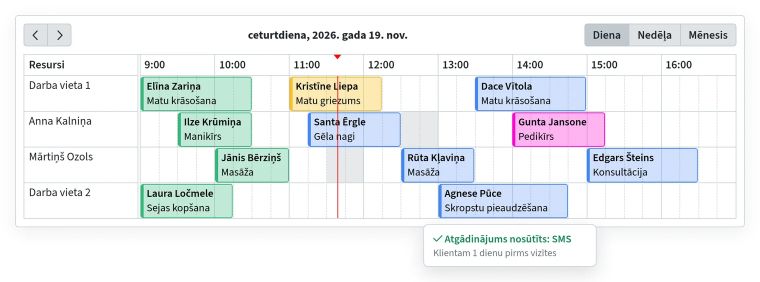
Resource planner day view: bookings by employee and workstation, showing the customer, service and status color, with an SMS reminder sent to the customer

To add a booking, click a free slot in the resource's row and choose the customer from the customer database. If a customer calls to ask for a different time, drag the booking to another hour or another technician, and if a job runs long, stretch the booking. For booking types with a set duration, the end time is calculated automatically. From the booking itself, you can prepare a document from a template (the Document generator module) and create a CRM deal.

A separate schedule for each department and one job shared by several technicians

In the planner, each department or team has its own board, a separate schedule with its own resources, working hours, color, statuses and reminders, so bookings from different departments don't get mixed up. If an employee works in several departments, you can reserve them for one board for a set period, and on those days nothing can be scheduled for them on the other boards.

When a job needs several people or workstations, one booking can have several time lines, each with its own resource, description and status.

SMS or email appointment reminders for customers

Before the appointment, for example a day ahead, the Resource planner module automatically sends the customer a reminder by email or SMS, taking both the phone number and the email address from the customer database. If you move the booking, the time in the reminder is updated automatically, so the customer doesn't get a message with the old time. You can attach a calendar invitation to the email reminder so the customer can add the appointment to their own calendar.

Each reminder shows whether it is still waiting to be sent, has been sent (and when) or could not be sent. If a customer says they didn't receive anything, you can check right away.

Statuses, a workshop screen and a manager's overview

Each planner board has its own color-coded statuses, so the color tells you at a glance what stage a job is at. A status can also close the job, lock it against editing and record the actual start or end time. All changes and statuses stay in the booking's history.

A board can be opened on a workshop computer without logging in, and technicians change the job status themselves when they start or finish work. The manager's dashboard, in turn, shows today's schedule, upcoming bookings and the bookings that still need to be confirmed.

Sound familiar?

We keep bookings in a paper notebook and can't see which technician or lift is free

Solution

In the Resource planner module, every employee, workstation and piece of equipment has its own timeline, so you can see at a glance which technician or lift is free at the time you need. The calendar also shows working hours and lunch breaks.

Customers forget their appointments

Solution

Before the appointment, for example a day ahead, the Resource planner module automatically sends the customer a reminder by email or SMS. If you move the booking, the time in the reminder changes too, and each reminder shows whether it has been sent.

We don't know what stage a job is at

Solution

Each planner board, such as one department's schedule, has its own color-coded statuses, so the color shows at a glance what stage each job is at. Technicians update the status themselves on the workshop screen, where the board can be opened without logging in.

One employee works in several departments

Solution

For a set period, you can reserve an employee for one department's schedule (its board in the planner), and on the other departments' boards those days are blocked for them. That way nobody books a customer with someone who is working elsewhere on those days.

Who it's for

Car service and tire shops

A timeline for every lift and technician, a reminder to the customer before the appointment, and a workshop screen where technicians mark the job stage themselves. Also suitable for car dealers' service departments.

Beauty salons and service businesses

A booking calendar for each specialist with working hours and lunch breaks, booking types with a set duration, and an automatic email or SMS reminder to the customer.

Companies with several departments or machines

Each department has its own board, a separate schedule with its own resources and statuses. A shared employee can be reserved for one department for a set period, and machine time is planned by the hour, just like an employee's.

What customers say

A flawless solution for resource planning.

The resource planner and the task module are an ideal help for organising our daily work, letting us manage team tasks more efficiently and plan work schedules. The CRM module lets us keep track of all communication with customers, put together custom car offers, tasks and more. All the information is easy to see and kept in one place, which we are very happy with.

Frequently asked questions

How much does the Resource planner module cost, and is there a charge for every employee?

The price of the Resource planner module depends on which ABCD modules you choose and how many users work in them. You don't pay for employees who only view the schedule, but you pay for SMS separately, at your own SMS gateway's rates. To find out the price for your company, contact us or request a free trial.

Can you try the Resource planner module for free?

Yes, you can try the Resource planner module free for one month, just like any other paid module. ABCD staff set up your company's account, so leave your name and phone number in the request form and we will get in touch.

When does the customer get the appointment reminder, and can it be sent by email and SMS?

The Resource planner module sends the reminder automatically before the appointment, for example a day ahead, and it can be sent both by email and by SMS. If you move the booking, the customer gets the reminder with the new time. You can also attach a calendar invitation to the email reminder.

Can you send a customer an SMS reminder without their separate consent?

Yes, as long as the Resource planner reminder only tells the customer about the booked appointment, because the customer's phone number and email address may be used for the performance of the contract. If you add a promotion or advertising to the reminder, it becomes a commercial communication, which usually requires the customer's prior consent.

Can technicians see the booking calendar on a workshop computer without logging in?

Yes, the Resource planner module lets you open a board (a planner view) on a workshop computer without logging in, with or without the right to change job statuses. Since it shows customer names, it is better to keep the screen in the workshop than somewhere visitors can see it.


Would this module be useful for your company?

You can try each paid module free for one month.

Other features

Invoicing

Invoices, e-invoices and payment tracking

Warehouse management

Stock levels, cost prices and picking

Swedbank Gateway

Bank statements and payments from Swedbank

Tildes Jumis integration

Invoices and payments arrive in Tildes Jumis

Payment links

Online invoice payment via link and QR code

Customer and product database

Customers, suppliers, products and price lists

API integration

Connecting your online store, website and other systems

B2B orders

Personal online store for business customers

Email campaigns

Newsletters and email marketing

CRM

Leads, deals and customer communication

Task manager

Tasks, deadlines and a kanban board for your team

Document generator

Contracts and handover forms from your Word templates

Complaint register

Complaints, claims and response deadlines

Coupons and surveys

Gift cards, coupons and customer surveys

Call log

Callback list and notifications

News

Internal announcements and news for employees

CMR consignment notes

Filling out and printing CMRs from your template

Special tools

Who has each tool and when it's due back

Car sales

Sales contracts, prepayment and final invoices

Key management

Where each car's key is

Tire hotel

Customer tire storage and storage receipts