The Document generator works with your own Word templates
The ABCD ERP Document generator module takes the Word (.docx) templates your company already uses and prepares contracts, certificates and other documents you have to issue regularly. Wherever the customer's name or the car's VIN should appear in the template, you type a placeholder, such as ${customer-title} or ${car-vin-nr}.
The module pulls customer, contact person, car, company and employee details from the cards, including the extra fields you have added to customer and car cards yourself. Customer, contact person and car cards are kept in the Customer and product database module. If the document needs something that isn't on a card, you add your own fields to the template, such as a text or date field, and fill them in when you create the document.
Mail merge in Word also fills in template fields, but it gets its data from a source such as an Excel spreadsheet, and the column names have to match the field names exactly. In this module, the data comes from the cards your employees work with every day.
Generating contracts from a template with customer and car details
To prepare a document, an employee chooses the template, the customer and, if the template requires them, the contact person and car. The customer doesn't have to sit and wait while someone retypes their details in Word, and there are also fewer typos, because the data comes from the card.
With the "Add number" button, you give the contract the next number from the numbering series linked to the template. You can download the finished document as a PDF or DOCX file straight from the print preview, email it as an attachment or copy a link to it. You can also create a document from a planner entry in the Resource planner module, and Word templates you enable for this can be printed directly from records in the Car sales module and from purchase invoices.
Signing on a tablet while the customer is still with you
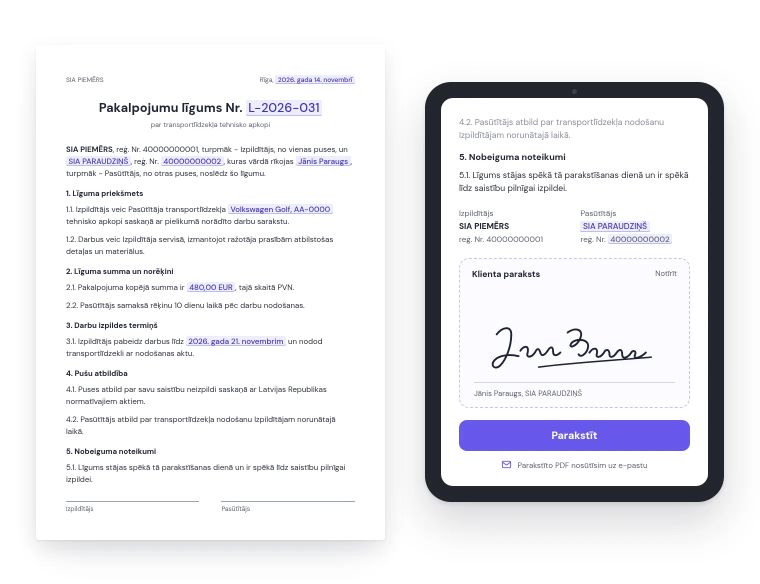
The employee and the customer sign the finished contract or certificate by hand on a tablet or right there on the screen, so no printer is needed. The signatures appear exactly where the template places them, and you can email the signed PDF to the customer while they are still with you.
After signing, the PDF is also sent automatically to the addresses set in the template, such as your accounting department. A closed document can no longer be changed by accident, and if something really does need to change, you reopen it for editing. If the document was signed by a private individual, a consent form can be opened right afterwards, and the consent is saved on the customer card.
Handover certificates and the customer's document history
If the mileage field in the certificate template is set up for it, the mileage entered in a handover certificate is saved to the car card automatically when you close the certificate, so you don't have to enter it again.
All documents are kept in the ABCD system with the customer and the car, and they appear in the customer's history in the CRM module together with the emails they were sent with. When a customer asks about their contract a year later, the salesperson opens it from the customer's history.