Swedbank statements in ABCD every morning, no files needed
When your company's Swedbank account is connected to ABCD, bank statements and incoming payments come in by themselves, and you no longer have to download the statement from the internet bank and then upload it to ABCD. ABCD links payments to customers and invoices on its own when it finds exactly one match. The Swedbank Gateway module works with Swedbank accounts in Latvia, Estonia and Lithuania and requires the Invoicing module.
Every day, yesterday's statement arrives by itself in the Bank import section, where you review and post its lines the same way as the lines of an uploaded file. Anyone who has downloaded the statement file themselves every morning knows how easy it is to forget one day and then have to import several statements at once at the end of the week.
Payment notifications: see a customer's payment the same day
If you switch on payment notifications in the module, every incoming payment shows up in ABCD within about a minute of the money being credited to your account. That way you learn about a customer's payment on the same day, not only the next day when the statement arrives.
Since 2025, banks in the eurozone have been required to handle both incoming and outgoing instant transfers, so when a customer pays by instant transfer, the money reaches your account within seconds. The next day's statement confirms a payment you have already been notified about, but ABCD does not import it a second time.
Automatic matching of payments to invoices and customers
For each payment that comes in through the Swedbank Gateway module, ABCD looks for the customer and the invoice by registration number, bank account or invoice number. If it finds exactly one match, it links the payment on its own: the invoice in the Invoicing module is marked as paid and the customer's balance is recalculated. All you have to do is review and post the lines, and match by hand only the ones ABCD did not match itself.
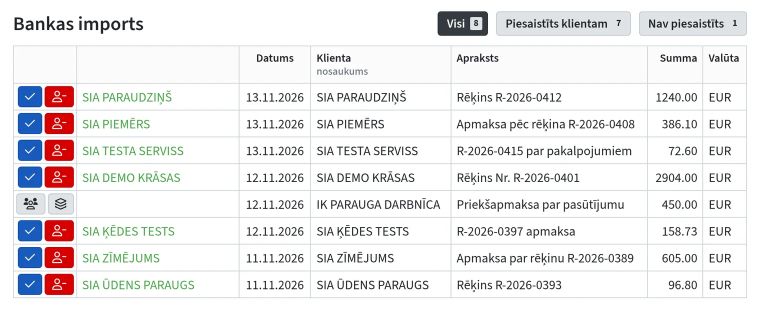
Your accountant no longer has to wait for someone to send the statement files, because the data comes into ABCD by itself every day. With the Tildes Jumis export module, posted bank lines can be sent on to Tildes Jumis. A statement that arrives automatically is not signed, but under the Accounting Law (Grāmatvedības likums) an uncertified account statement is a valid supporting document if the existence of the transaction is confirmed in the manner set by the head of the company.
Swedbank Gateway operator connection: no certificates to buy, no passwords to hand over
ABCD is a Swedbank Gateway operator, so you do not have to buy certificates or build your own connection to the bank. Your company's authorized signatory signs the agreement in the Swedbank internet bank, you then enter only the agreement number in ABCD, and you do not have to give ABCD your internet bank login credentials.
If you have several Swedbank accounts, you choose which of them to import, and if an account is not being imported, the reason is shown next to it. The connection status is always visible: the date up to which statements have been received and when the last payment came in.
How to connect Swedbank Gateway
- Once the Swedbank Gateway module is switched on, open the link to the Swedbank internet bank in the ABCD Finance settings.
- Your company's authorized signatory signs an agreement in the internet bank that names ABCD as the operator.
- Enter the agreement number in ABCD and check the connection.
- Choose which Swedbank accounts to import and whether to receive payment notifications as well.
From then on, yesterday's statement arrives in ABCD every morning, and if you disconnect, the import stops immediately.